Back Story:
My partner embarked on a 30 Day Fitness Challenge during this circuit breaker period. He would send me his progress pictures daily to, one, keep track of them and, two, stay accountable in his fitness journey. It sparked the idea for this project.
A passion project for fitness enthusiasts
to document their fitness journey visually.

dayto
Overview
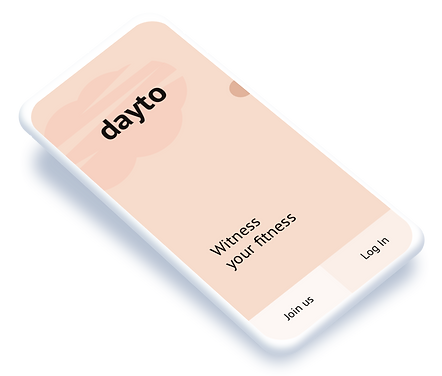
Summary: dayto is photo-taking and photo-editing mobile application that spur users on their fitness journey with a simple visual record of their progress.
My Role: From idea conceptualisation to fruition, I handled it single-handedly.
Method and Tools: User and Market Research, Persona and Scenario, Wireframing, Low-fidelity Prototyping, High-fidelity Prototyping, Sketch, Invision, User Testings
The Problem
Embarking on fitness journeys usually require high level of commitment and motivation. Most people leverage on technology such as calorie tracking apps, to help them stay accountable to their fitness journey.
It is common practice to keep a photo album of body progress pictures to help people stay on course. However, their personal photo albums tend to be cluttered with other irrelevant photos (such as memes, pet pictures) making it hard to clearly view their body progress.
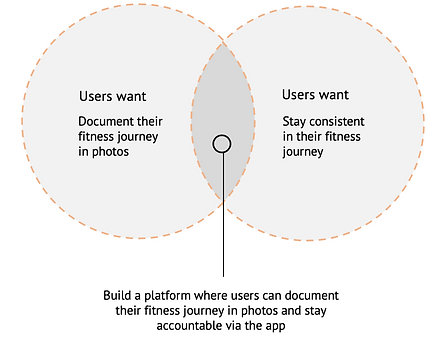
This is where dayto begins –– it provides users a platform to document their fitness journey while giving them a sense of accountability.
Market Research
There are many weight loss apps such as MyFitnessPal, in the market.
However, these apps tend to focus heavily on the user's weight, which may be misleading. A user could have lost body fat and gained muscle, but his/her weight would have stayed the same.
So tracking your weight isn't quite good enough. Photos provide an honest look into your fitness progress. dayto makes progress tracking easy.
It conquers ‘scale anxiety’ and mathematical analysis. It takes the sting out of plateaus and shows true progress using visual cues. The app is a perfect supplement to an average person’s health journey. Users can use this app to collect their own data in a safe place.
Elements of Value
Using Bain & Co's 'The Elements of Value Pyramid', I categorised the elements of value associated with users needs and goals, and illustrated what do they entail from a design perspective. In general, the more elements of value provided, the greater the customers' loyalty and business's sustained revenue growth.

Understanding the User
Have you ever taken body images of yourself to track your body progress?
Yes
89.5%
Problem from Users
Taken photos are shuffled with other daily photos in one’s local storage due to high volume of photos and small thumbnails.
They lack motivation to continually update their fitness journey especially when there is no progress.
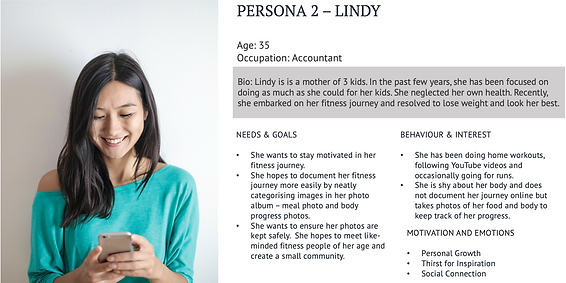
They feel shy to take photos of themselves, especially if someone runs through their photo album and spot the images.
It gets tedious to reorganise and sort shuffled images between daily photos and body images taken.
User Persona
Aligning user goals with business goals
After interviewing potential users, I developed the service storyboard / use cases and clarified the different user and business goals at each stage. This aids in the conceptualisation of the prototype.
Hover your mouse over to see all 6 stages!
Design Principles
Design for a habit-forming product:
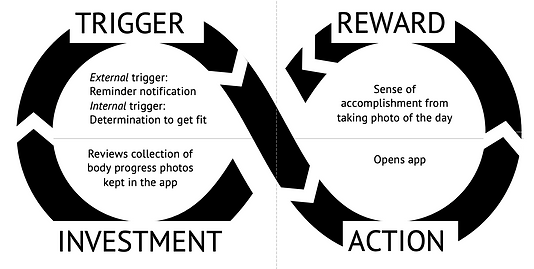
dayto is that the act of documenting body progress photos which doesn’t come natural to most users. This requires attaching the product to users’ daily routines, behaviours and emotions.
Using the Hook Model, I illustrated how the product can be successful and used habitually.
Design for trust
For dayto to be effective, the product has to gain the trust of users.
1. Security
The product must allow users to feel in control of their personal data. People are protective of their personal photos and security can manifest in enabling password-protected access to photos.
2. Transparent
The product strikes a balance between privacy and transparency, providing an emotional environment that is trusting, safe and evokes a sense of belonging.
3. Encouraging
The product provides intuitive, personable and guided paths that encourage users to take photos and facilitate management of photos taken.
4. Meaningful
The product provides an experience that is valuable, personalized and empowers offline body confidence.
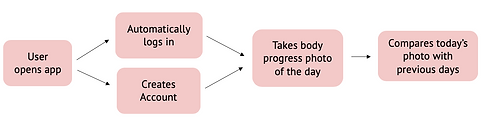
User Flow

Wireframes V1
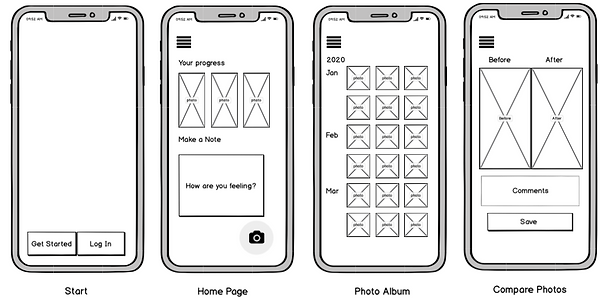
I kept the first version of the product simple, as I wanted there to be only one clear reason as to why users would use dayto: to visually document their fitness journey. Too many functionalities can confuse the users. More features can be added as the product mature.
Introducing
dayto
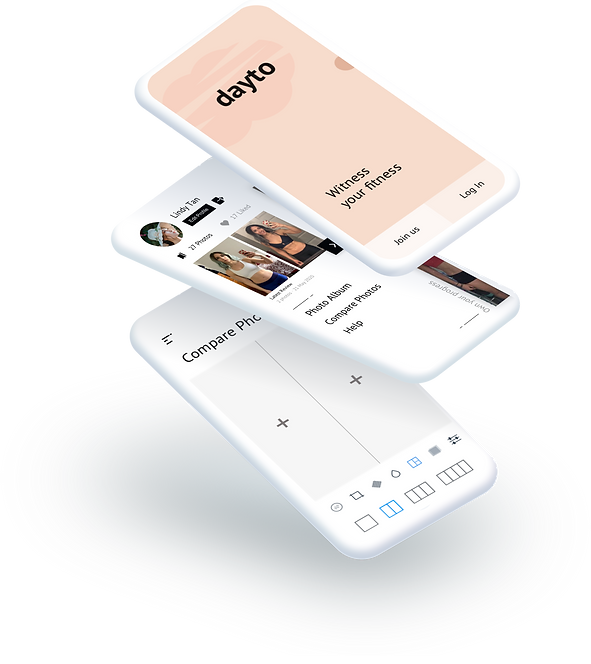
dayto [dey-toh]
An app that allows users to track and document their body progress in photos. It also aims to motivate users to strive for progress in their health.
The app name is is a portmanteau of the term “daily photos".
UI and Colour Scheme
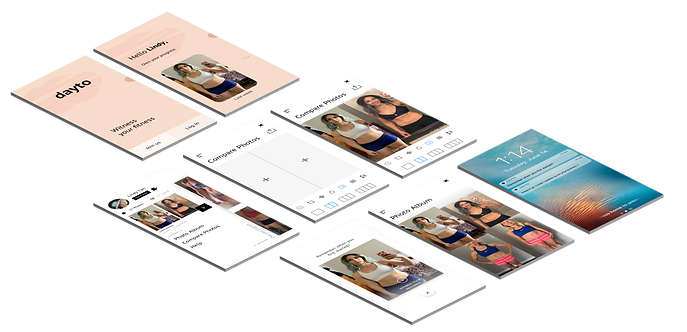
The UI is kept clean and sleek to allude to the transparency between the app developer and user.
The warm peachy colour is chosen to evoke the safe and encouraging environment of dayto. As the app contains vulnerable pictures of the user, it is important that users trust the app.
Tone
Copy takes on a friendly and uplifting tone in the collective voice to encourage users to sign up.
Hover your mouse over to see design rationale
3 cups
Flour
Reassure users on duration
1½ cups
Butter
Add human touch
Progress bar to guide users
Hints for users to seek inspiration from others
Gain user's trust
Structure of Sign Up flow
-
Sequencing: “Users are more likely to take action when complex activities are broken down into smaller tasks” and also presents information in a clear manner. Flow is smoother and user feels serene.
-
Provide reassurance about data privacy: By explaining in the copy why each piece of personal information is needed, users are more likely to trust the app with their photos too.
-
Human touch: A welcome message from ‘Matt’, dayto’s Head of Community, is placed to add a human presence in the flow. In line with the app’s aim to motivate, users will benefit from a sense that someone is personally taking care of your case, even if it’s just a computer-generated message.
-
Provide hints: Allow users to benchmark their app experience with inspirations from other users.
Features
-
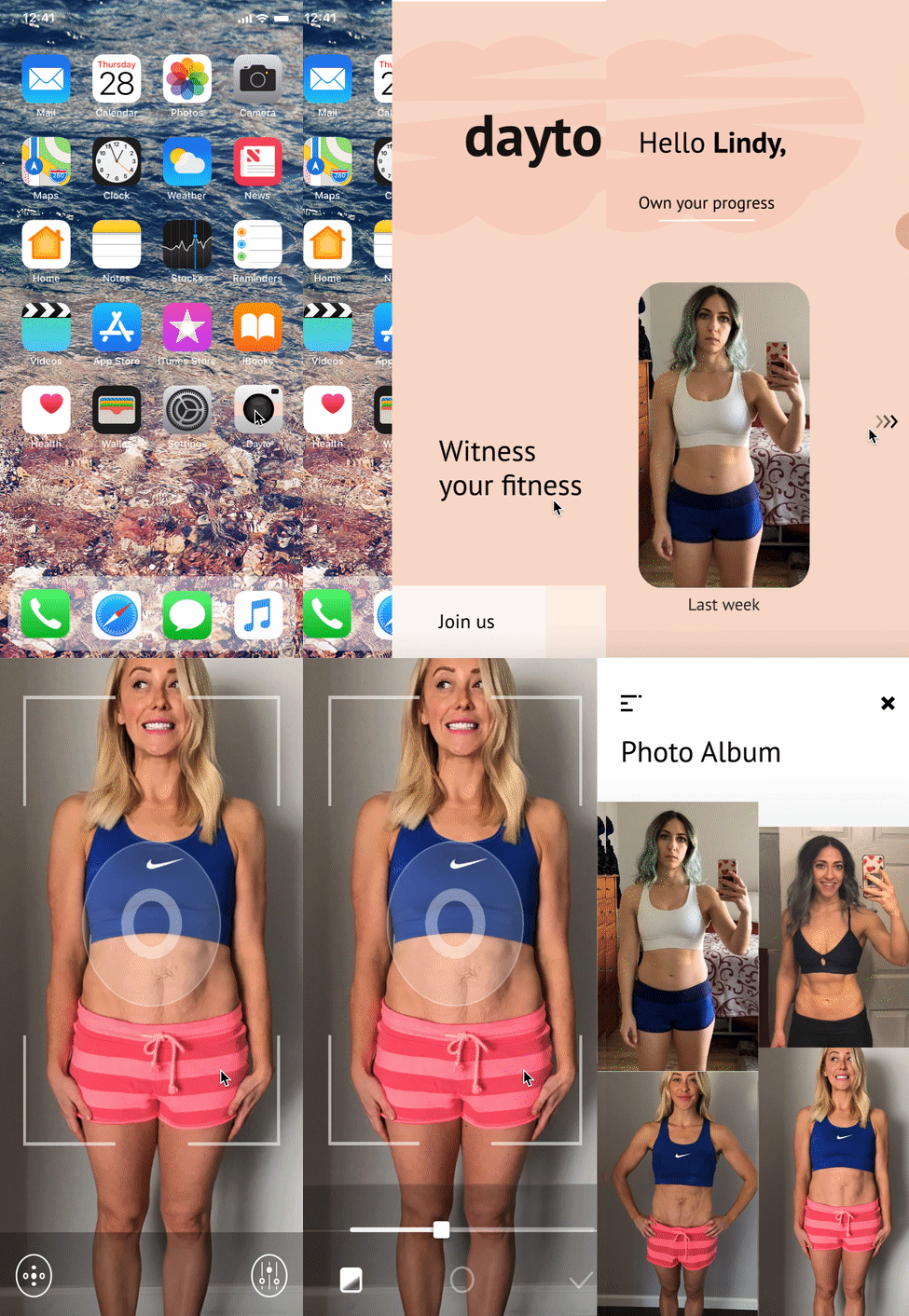
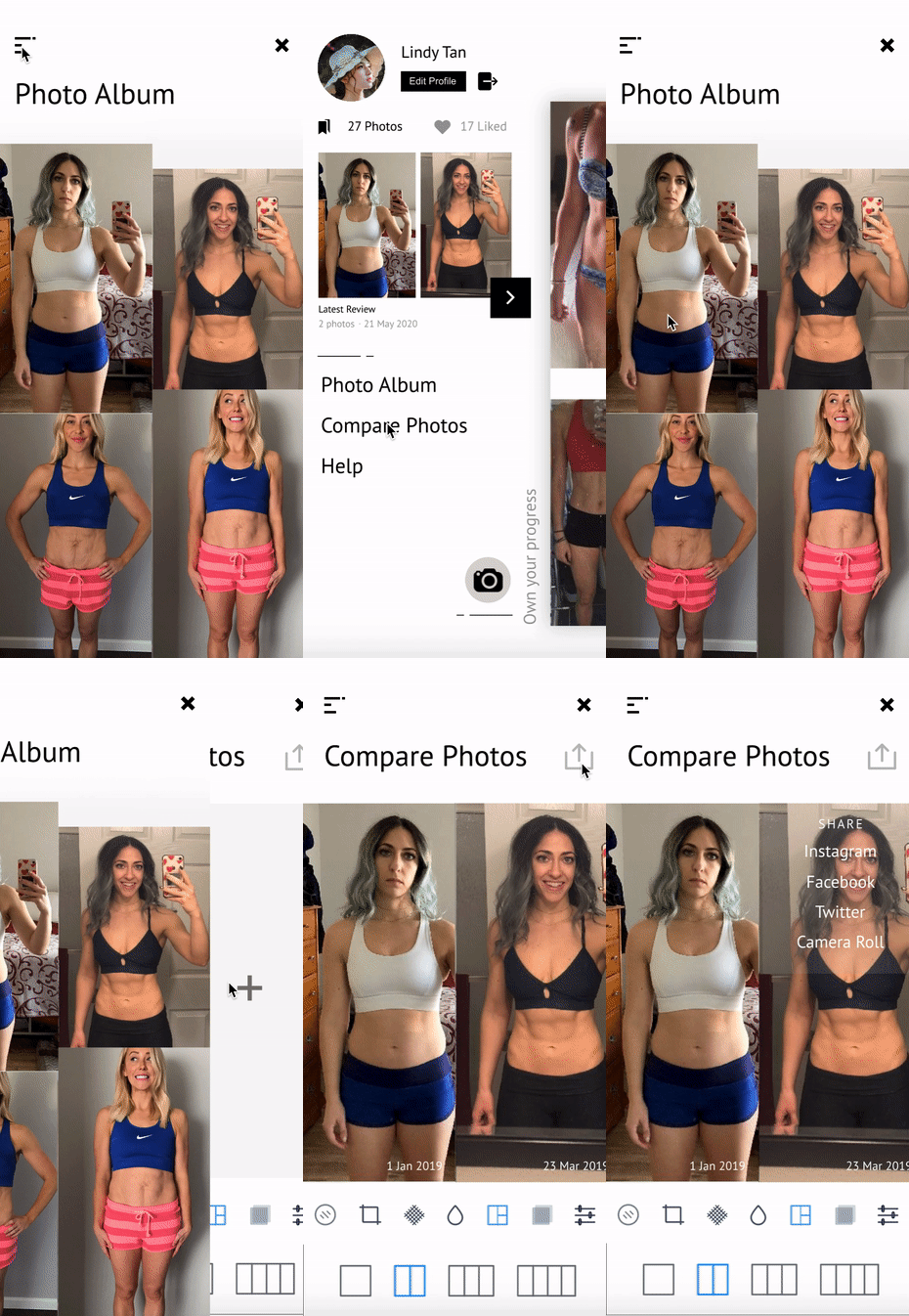
Basic Photo Editing: dayto allows users to edit the photos to their liking, especially since the photos taken may have different lighting.
-
Photo Album: The photos taken on dayto will not be stored with the phone camera roll unless shared or opted in. This neatly segregates the user's body progress photos with other daily photos, which is a key user need as established earlier.
hey, the image moves!
-
Compare past and present photos: dayto comes with custom photo layout for users to make collages of their photos. When a photo is selected, a time stamp will be placed at the bottom left corner. This enables users to clearly view their body progress chronologically.
this moves too!
Notifications
-
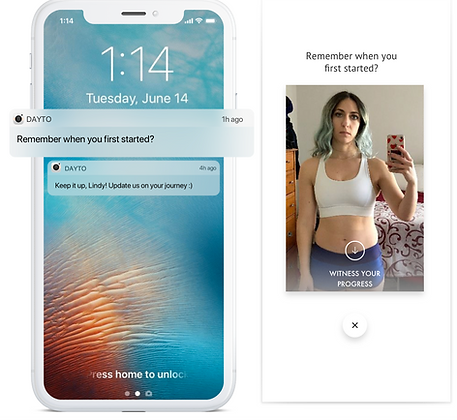
Morning: Users can set the timing and frequency of notification from dayto to remind them to take a photo. As people tend to take body progress shots in the morning, the ideal notification timing will be just as the user is about to rise from bed.
-
Once every 2 weeks: To keep users motivated on their fitness journey, the app will send a gentle reminder and remind them of their old photos. It is meant to resemble an e-card to give it a personalised touch.
Ideation V2
Based on the market size and user needs, dayto can release more features accordingly such as a note journal, app community. A community culture would have the twin effect of reinforcing user loyalty and spurring users on in their fitness journey.
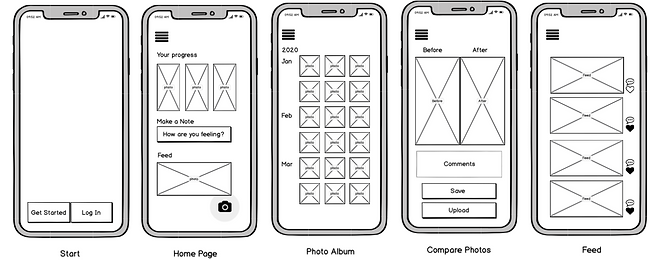
In Version 2, I added new features such as a newsfeed and a fitness community. Version 1 allowed the product to first gain traction in the market and build its user base. Version 2 elevates the product to a social networking platform where people can freely share their fitness journey in photos.
Users have the option to join the community. They can choose to keep their photos personal and not share them with the public and use the app as in Version 1. And occasionally get inspired from progress photos shared by active contributors in the dayto fitness community.
Impact
What I would do differently
The prototype was well-received by my limited test group. Due to social distancing measures, I was not able to interview and test it out with as many users as I would have like. The feedback I gotten was that this would be very popular for people attempting the 'Chloe Ting 30-day workout challenge' to track their core progress.
I believe dayto is able to meet user needs neatly and has recurring value for people at all parts of their fitness journey.
Due to my limited resources, I missed out on opportunities to make this better. If I could push further, I would test in a physical setting, dive deeper into the user's journey, explore its UI and add more app functions.
Reflection
Taking full ownership of the work helps me deeply think through each step in the design process and ultimately bring the idea from conception to fruition.
I kept my first project small to ensure that the solution provided would be robust and met user's needs. For my next project, I hope to increase the scale and tackle more pertinent issues.
next

mini design exercise to improve the user interface of shopee's landing site
product design